
2025年完美收官,2026年全新启封。
回顾一年的博客生活,想对他进行一个总结,进行一些数据统计,于是我求助于 DeepSeek 出个方案,它推荐了几款 WordPress 全年博文总结插件,如 Annual Archive、WP Annual Report 等,但都已好多年未更新了,wordpress.org 上也没有下载了,而推荐的 Simple Yearly Archive 是按年份归档插件,不适用。
于是 DeepSeek 给了个代码,通过在主题的 functions.php 文件中添加来实现此功能,并且可以在文章编辑器中直接插入短代码来完成,这样就能在一篇博文中回顾总结一年的博文数据了,具体效果如下:
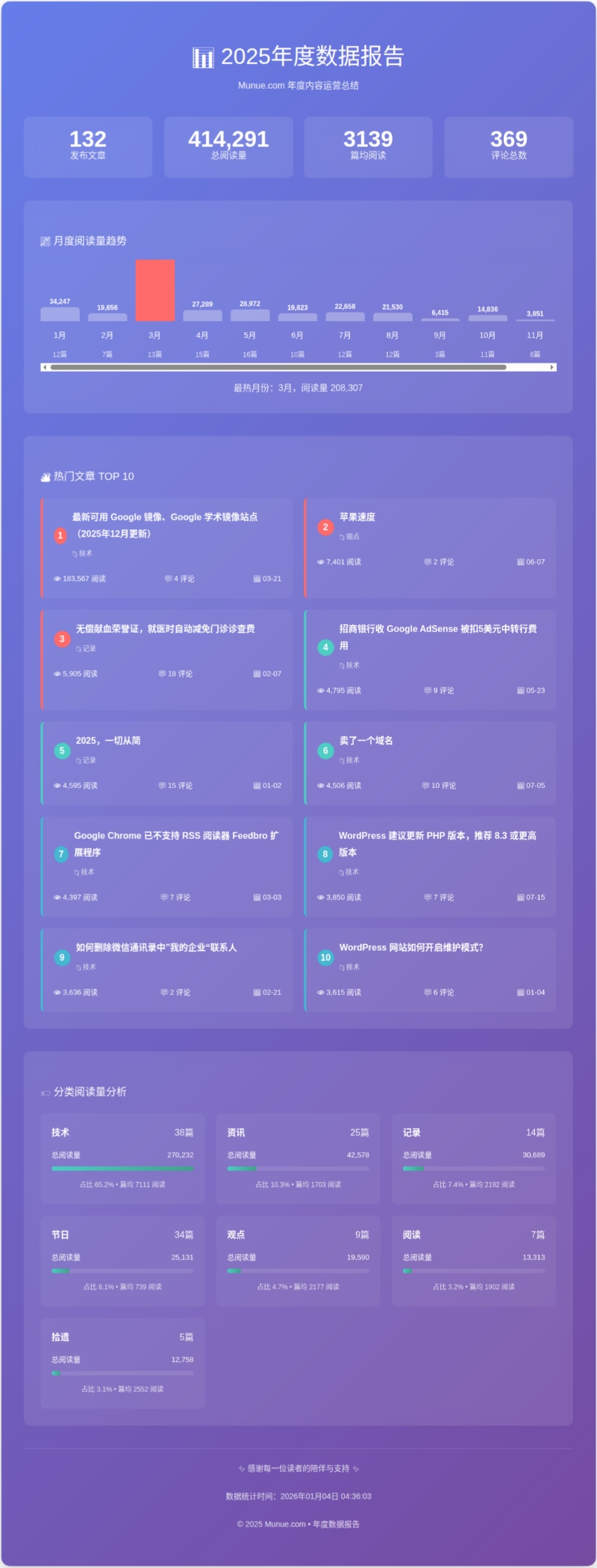
有朋友问这个报告是如何实现 ,我将代码附后,有需要的网友自取:
// 生成2025年博文总结(含阅读量)
function munue_annual_summary_2025() {
$year = 2025; // 统计年份// 获取所有文章
$args = array(
'year' => $year,
'posts_per_page' => -1,
'post_status' => 'publish',
'post_type' => 'post'
);$posts = get_posts($args);
$total_posts = count($posts);// 初始化统计数组
$monthly_stats = array_fill(1, 12, array('posts' => 0, 'views' => 0));
$categories_stats = array();
$all_views = 0;
$all_comments = 0;// 遍历文章进行统计
foreach ($posts as $post) {
// 获取阅读量(使用不同的阅读量插件兼容方案)
$views = get_post_meta($post->ID, 'views', true); // WP-PostViews 插件
if (empty($views)) {
$views = get_post_meta($post->ID, '_post_views', true); // 其他插件
}
if (empty($views)) {
$views = get_post_meta($post->ID, 'post_views_count', true); // Jetpack
}
if (empty($views) || !is_numeric($views)) {
$views = 0;
}// 获取评论数
$comments = get_comments_number($post->ID);// 月度统计
$month = date('n', strtotime($post->post_date));
$monthly_stats[$month]['posts']++;
$monthly_stats[$month]['views'] += $views;// 总统计
$all_views += $views;
$all_comments += $comments;// 分类统计
$categories = wp_get_post_categories($post->ID);
foreach ($categories as $cat_id) {
$cat_name = get_cat_name($cat_id);
if (!isset($categories_stats[$cat_id])) {
$categories_stats[$cat_id] = array(
'name' => $cat_name,
'posts' => 0,
'views' => 0
);
}
$categories_stats[$cat_id]['posts']++;
$categories_stats[$cat_id]['views'] += $views;
}
}// 热门文章(按阅读量排序)
$popular_args = array(
'year' => $year,
'posts_per_page' => 10,
'meta_key' => 'views',
'orderby' => 'meta_value_num',
'order' => 'DESC',
'meta_query' => array(
array(
'key' => 'views',
'value' => '0',
'compare' => '>',
'type' => 'NUMERIC'
)
)
);
$popular_posts = get_posts($popular_args);// 平均数据
$avg_views_per_post = $total_posts > 0 ? round($all_views / $total_posts) : 0;
$avg_comments_per_post = $total_posts > 0 ? round($all_comments / $total_posts, 1) : 0;// 查找最高阅读量月份和文章
$max_views_month = 0;
$max_views_count = 0;
foreach ($monthly_stats as $month => $data) {
if ($data['views'] > $max_views_count) {
$max_views_count = $data['views'];
$max_views_month = $month;
}
}// 生成HTML输出
ob_start();
?>
<div class="annual-summary-2025" style="
background: linear-gradient(135deg, #667eea 0%, #764ba2 100%);
padding: 40px;
border-radius: 15px;
margin: 30px 0;
color: white;
box-shadow: 0 10px 30px rgba(0,0,0,0.2);
">
<div style="text-align: center; margin-bottom: 40px;">
<h1 style="color: white; margin-bottom: 10px; font-size: 2.5em;">📊 2025年度数据报告</h1>
<p style="opacity: 0.9;">Munue.com 年度内容运营总结</p>
</div><!-- 核心数据总览 -->
<div style="
display: grid;
grid-template-columns: repeat(auto-fit, minmax(200px, 1fr));
gap: 20px;
margin-bottom: 40px;
">
<div style="
background: rgba(255,255,255,0.1);
padding: 25px;
border-radius: 10px;
text-align: center;
backdrop-filter: blur(10px);
">
<div style="font-size: 2.5em; font-weight: bold;"><?php echo $total_posts; ?></div>
<div style="opacity: 0.9;">发布文章</div>
</div><div style="
background: rgba(255,255,255,0.1);
padding: 25px;
border-radius: 10px;
text-align: center;
backdrop-filter: blur(10px);
">
<div style="font-size: 2.5em; font-weight: bold;"><?php echo number_format($all_views); ?></div>
<div style="opacity: 0.9;">总阅读量</div>
</div><div style="
background: rgba(255,255,255,0.1);
padding: 25px;
border-radius: 10px;
text-align: center;
backdrop-filter: blur(10px);
">
<div style="font-size: 2.5em; font-weight: bold;"><?php echo $avg_views_per_post; ?></div>
<div style="opacity: 0.9;">篇均阅读</div>
</div><div style="
background: rgba(255,255,255,0.1);
padding: 25px;
border-radius: 10px;
text-align: center;
backdrop-filter: blur(10px);
">
<div style="font-size: 2.5em; font-weight: bold;"><?php echo $all_comments; ?></div>
<div style="opacity: 0.9;">评论总数</div>
</div>
</div><!-- 月度阅读量图表 -->
<div style="
background: rgba(255,255,255,0.1);
padding: 30px;
border-radius: 10px;
margin-bottom: 40px;
backdrop-filter: blur(10px);
">
<h3 style="color: white; margin-bottom: 20px;">📈 月度阅读量趋势</h3>
<div style="display: flex; align-items: flex-end; height: 200px; gap: 15px; overflow-x: auto;">
<?php
$max_month_views = max(array_column($monthly_stats, 'views'));
$month_names = ['1月', '2月', '3月', '4月', '5月', '6月', '7月', '8月', '9月', '10月', '11月', '12月'];foreach ($monthly_stats as $month => $data):
$height = $max_month_views > 0 ? ($data['views'] / $max_month_views) * 150 : 5;
$is_max = ($month == $max_views_month);
?>
<div style="flex: 1; min-width: 70px; text-align: center;">
<div style="
background: <?php echo $is_max ? '#ff6b6b' : 'rgba(255,255,255,0.3)'; ?>;
height: <?php echo $height; ?>px;
border-radius: 5px 5px 0 0;
margin-bottom: 10px;
position: relative;
">
<div style="
position: absolute;
top: -25px;
left: 0;
right: 0;
font-size: 12px;
font-weight: bold;
"><?php echo number_format($data['views']); ?></div>
</div>
<div style="font-size: 14px; margin-bottom: 5px;"><?php echo $month_names[$month-1]; ?></div>
<div style="font-size: 12px; opacity: 0.8;"><?php echo $data['posts']; ?>篇</div>
</div>
<?php endforeach; ?>
</div>
<?php if ($max_views_month > 0): ?>
<div style="text-align: center; margin-top: 15px; opacity: 0.9;">
最热月份:<?php echo $max_views_month; ?>月,阅读量 <?php echo number_format($max_views_count); ?>
</div>
<?php endif; ?>
</div><!-- 热门文章TOP 10 -->
<?php if (!empty($popular_posts)): ?>
<div style="
background: rgba(255,255,255,0.1);
padding: 30px;
border-radius: 10px;
margin-bottom: 40px;
backdrop-filter: blur(10px);
">
<h3 style="color: white; margin-bottom: 25px;">🔥 热门文章 TOP 10</h3>
<div style="display: grid; grid-template-columns: repeat(auto-fit, minmax(300px, 1fr)); gap: 20px;">
<?php foreach ($popular_posts as $index => $post):
setup_postdata($post);
$post_views = get_post_meta($post->ID, 'views', true);
if (empty($post_views)) $post_views = 0;
$comments = get_comments_number($post->ID);
$categories = get_the_category($post->ID);
$category_name = !empty($categories) ? $categories[0]->name : '未分类';
?>
<div style="
background: rgba(255,255,255,0.05);
padding: 20px;
border-radius: 8px;
border-left: 4px solid <?php
echo $index < 3 ? '#ff6b6b' : ($index < 6 ? '#4ecdc4' : '#45b7d1');
?>;
">
<div style="display: flex; align-items: center; margin-bottom: 10px;">
<span style="
background: <?php
echo $index < 3 ? '#ff6b6b' : ($index < 6 ? '#4ecdc4' : '#45b7d1');
?>;
color: white;
width: 30px;
height: 30px;
border-radius: 50%;
display: flex;
align-items: center;
justify-content: center;
font-weight: bold;
margin-right: 10px;
"><?php echo $index + 1; ?></span>
<div>
<a href="<?php echo get_permalink($post->ID); ?>" style="
color: white;
text-decoration: none;
font-weight: bold;
font-size: 16px;
display: block;
"><?php echo get_the_title($post->ID); ?></a>
<span style="font-size: 12px; opacity: 0.8; margin-top: 5px; display: block;">
📁 <?php echo $category_name; ?>
</span>
</div>
</div><div style="display: flex; justify-content: space-between; margin-top: 15px; font-size: 13px;">
<span>👁️ <?php echo number_format($post_views); ?> 阅读</span>
<span>💬 <?php echo $comments; ?> 评论</span>
<span>📅 <?php echo get_the_date('m-d', $post->ID); ?></span>
</div>
</div>
<?php endforeach;
wp_reset_postdata(); ?>
</div>
</div>
<?php endif; ?><!-- 分类阅读量统计 -->
<?php if (!empty($categories_stats)): ?>
<div style="
background: rgba(255,255,255,0.1);
padding: 30px;
border-radius: 10px;
backdrop-filter: blur(10px);
">
<h3 style="color: white; margin-bottom: 25px;">🏷️ 分类阅读量分析</h3>
<div style="display: grid; grid-template-columns: repeat(auto-fit, minmax(250px, 1fr)); gap: 20px;">
<?php
// 按阅读量排序
usort($categories_stats, function($a, $b) {
return $b['views'] - $a['views'];
});foreach ($categories_stats as $cat):
$percentage = $all_views > 0 ? round(($cat['views'] / $all_views) * 100, 1) : 0;
?>
<div style="
background: rgba(255,255,255,0.05);
padding: 20px;
border-radius: 8px;
">
<div style="display: flex; justify-content: space-between; margin-bottom: 10px;">
<span style="font-weight: bold; font-size: 16px;"><?php echo $cat['name']; ?></span>
<span style="opacity: 0.9;"><?php echo $cat['posts']; ?>篇</span>
</div><div style="margin-bottom: 10px;">
<div style="display: flex; justify-content: space-between; font-size: 13px; margin-bottom: 5px;">
<span>总阅读量</span>
<span><?php echo number_format($cat['views']); ?></span>
</div>
<div style="background: rgba(255,255,255,0.1); height: 8px; border-radius: 4px; overflow: hidden;">
<div style="
background: linear-gradient(90deg, #4ecdc4, #44a08d);
width: <?php echo min(100, $percentage * 2); ?>%;
height: 100%;
"></div>
</div>
</div><div style="font-size: 12px; opacity: 0.8; text-align: center;">
占比 <?php echo $percentage; ?>% • 篇均 <?php echo $cat['posts'] > 0 ? round($cat['views'] / $cat['posts']) : 0; ?> 阅读
</div>
</div>
<?php endforeach; ?>
</div>
</div>
<?php endif; ?><!-- 页脚 -->
<div style="
text-align: center;
margin-top: 40px;
padding-top: 20px;
border-top: 1px solid rgba(255,255,255,0.2);
font-size: 14px;
opacity: 0.8;
">
<p>✨ 感谢每一位读者的陪伴与支持 ✨</p>
<p>数据统计时间:<?php echo date('Y年m月d日 H:i:s'); ?></p>
<p>© <?php echo $year; ?> Munue.com • 年度数据报告</p>
</div>
</div><!-- 添加CSS动画 -->
<style>
.annual-summary-2025 .stat-card {
transition: transform 0.3s ease;
}
.annual-summary-2025 .stat-card:hover {
transform: translateY(-5px);
}
@media (max-width: 768px) {
.annual-summary-2025 {
padding: 20px !important;
}
.annual-summary-2025 h1 {
font-size: 1.8em !important;
}
}
</style>
<?phpreturn ob_get_clean();
}
add_shortcode('annual_summary_2025', 'munue_annual_summary_2025');// 添加额外的阅读量统计功能(如果使用WP-PostViews插件)
function enhance_views_tracking() {
// 如果安装了WP-PostViews插件,使用其功能
if (function_exists('the_views')) {
// 已经支持,无需额外处理
} else {
// 提供基本的阅读量跟踪
add_action('wp_head', 'track_post_views');
function track_post_views() {
if (is_single()) {
$post_id = get_the_ID();
$count_key = 'views';
$count = get_post_meta($post_id, $count_key, true);
if ($count == '') {
$count = 0;
delete_post_meta($post_id, $count_key);
add_post_meta($post_id, $count_key, '0');
} else {
$count++;
update_post_meta($post_id, $count_key, $count);
}
}
}
}
}
add_action('init', 'enhance_views_tracking');
使用方法
步骤 1:添加代码
-
登录 WordPress 后台
-
进入「外观」→「主题文件编辑器」
-
选择
functions.php -
将上面的代码粘贴到文件底部
-
点击「更新文件」
步骤 2:在页面中使用
-
创建新页面或编辑现有页面
-
在内容中添加短代码:
【annual_summary_2025】 -
发布页面
步骤3:在文章中使用
-
编辑文章
-
在内容任意位置(通常在开头或结尾)
-
切换到「文本」模式(不是可视化)
-
输入短代码:
【annual_summary_2025】 -
更新文章
注:实际使用时,短代码的 【】 改成 [ ]。
📊 2025 年度内容报告
随风沐虐 年度数据分析
📅 月度数据明细
🔥 热门文章TOP 10
📂 分类数据统计
历史上的今天:
- 2022: 登录电脑版微信无需手机确认了,还可仅使用文件传输助手功能 (1)
- 2022: 1月1日,元旦 (0)










元旦快乐!
报告页面很是精美,数据也很完整!
2026,加油!
@Lvtu 觉得可以做成一个简单的插件,这样每年年终时都可直接输出报告。
@maqingxi 嗯,其实在报告页面加个时间判断也可以。。。
@Lvtu 是呢,2026年,就加个2026的函数。
ds挺强呀。技术类的阅读最多。
@acevs 是的,技术类搜索量最大。
代码可以分享出来?我也行体验,园地快乐。
@Diego 可以呀,代码已附后。
@maqingxi 谢谢,已经采用,非常nice!
@Diego 不客气,我也只是互联网资源的搬运工。
wow,拿走多谢啦
@老何 你客气了。就是想加个留言排行榜,死活查询不出数据,最后只好放弃了。
厉害哇!我本想看看我的,结果发现没写啥东西。
@姜辰 也是简单回顾,凑个热闹。